Skip to content
GrowX

GrowX, the Chrome extension for X (Twitter) growth

Built to follow the right people, schedule posts and threads, write with on-device AI, see which posts work, spot who unfollowed you, reply early to fresh posts and clean up your following.

GrowX follows the right people, posts at your best times, writes with on-device AI and shows you what works. One simple Chrome extension, free to start.

  • Free plan forever
  • 30-day Premium trial, no credit card
  • Never asks for your X password
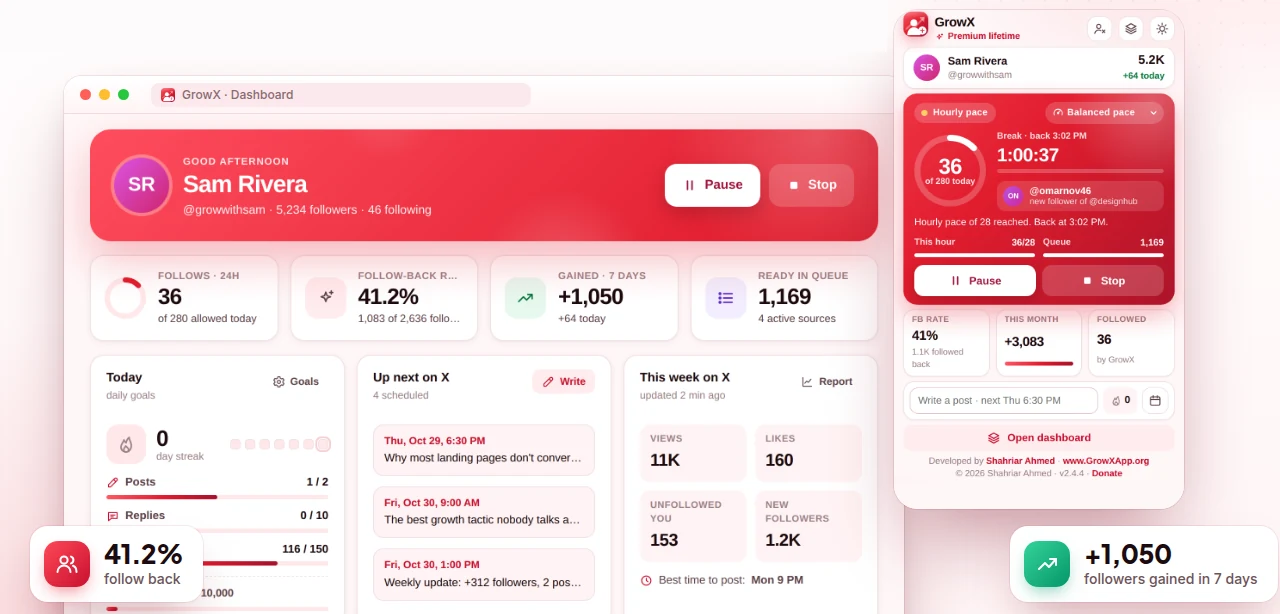
GrowX dashboard: today's follows and goals, posts up next on X, this week's numbers and the popup with the Balanced pace running (demo data)

Screenshots show demo data.

What's inside
growth tools
7
templates
52
pace presets
4
follow-back score
1-99
posts per thread
25
Everything in one extension

Seven growth tools. One simple dashboard.

Stop juggling a follow tool, a scheduler and an analytics app. GrowX does the daily work of growing on X in one place.

  • Command palette · Ctrl+K
  • 8 colour themes
  • Dark mode
  • Daily goals and streaks
  • Workspace per X account (Premium)
  • Chrome sync
  • Backup and restore
  • Evergreen recycling (Premium)
  • Auto-plug (Premium)
  • Weekly report (Premium)
  • VIP alerts (Premium)
  • 21 languages
  • AI reply buttons on X (Premium)
  • One device per X account slot
  • List follow (CSV or TXT)
  • List import (Premium)
  • Emergency stop · Alt+Shift+S
  • Chrome 116+ · desktop
See it in action

Built for the way you actually grow on X.

Each part of GrowX handles one job well, and they all share what they learn.

01Grow

Pick a pace. Press Start.

GrowX follows the newest followers of accounts in your niche, the people most likely to follow you back, one at a time with breaks and caps. It keeps going in the background until you press Stop.

  • Safe (~150 a day) and Balanced (~280 a day) paces on the free plan
  • Follow-back score from 1 to 99 and filters that skip bots and inactive accounts
  • Find sources for me: GrowX suggests sources from the accounts you follow
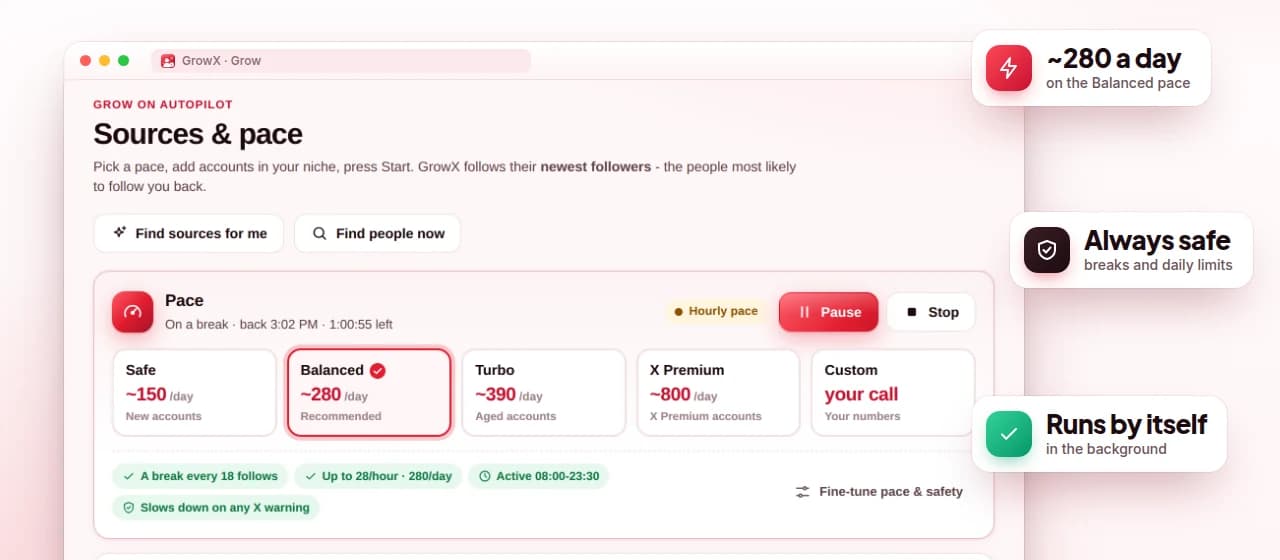
GrowX Grow page: Sources and pace with Safe, Balanced, Turbo, X Premium and Custom presets (demo data)

Screenshot shows demo data.

02Create

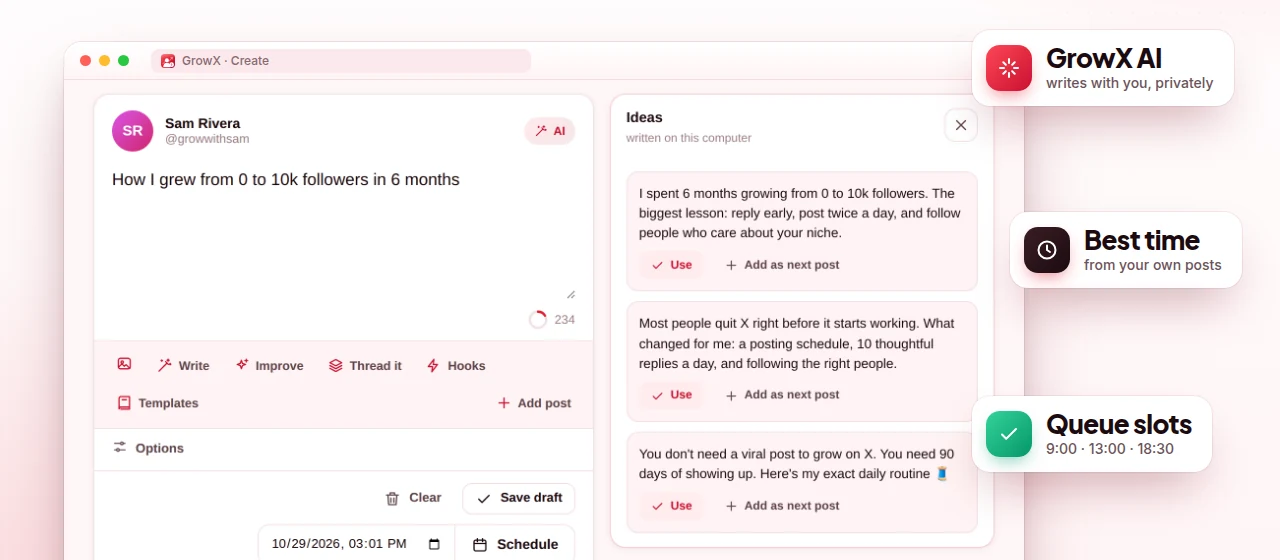
Write once. Post at your best times.

Posts and threads with images, queue slots and a calendar. GrowX learns your best time to post from your own posts and when your followers are active.

  • Post now, schedule, or add to your queue slots
  • 52 templates and a thread splitter that counts like X does
  • GrowX AI writes ideas, hooks and threads on your computer (Premium)
GrowX Create page: post composer with AI ideas, best time and queue slots (demo data)

Screenshot shows demo data.

03Insights

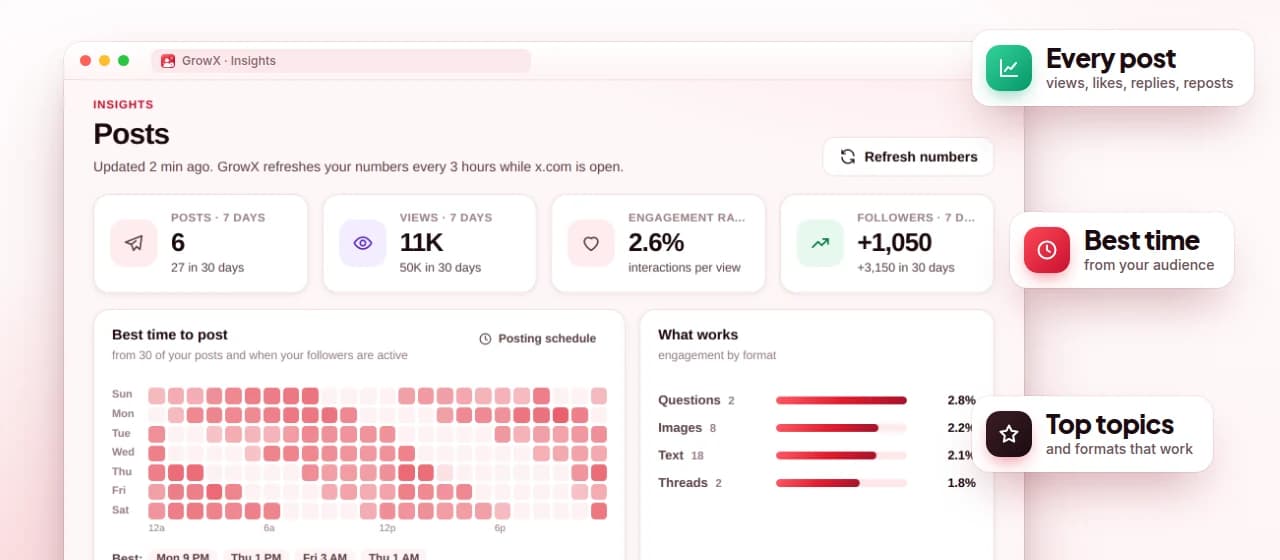
Know which posts bring followers.

Views, likes, replies, reposts and engagement for every post, a heat map of your best times and the topics and formats that work for your audience.

  • Refreshed every 3 hours while x.com is open
  • Topics and formats ranked by engagement
  • Weekly report: this week vs last week (Premium)
GrowX Insights page: post numbers, best time to post heat map and what works by format (demo data)

Screenshot shows demo data.

04Followers

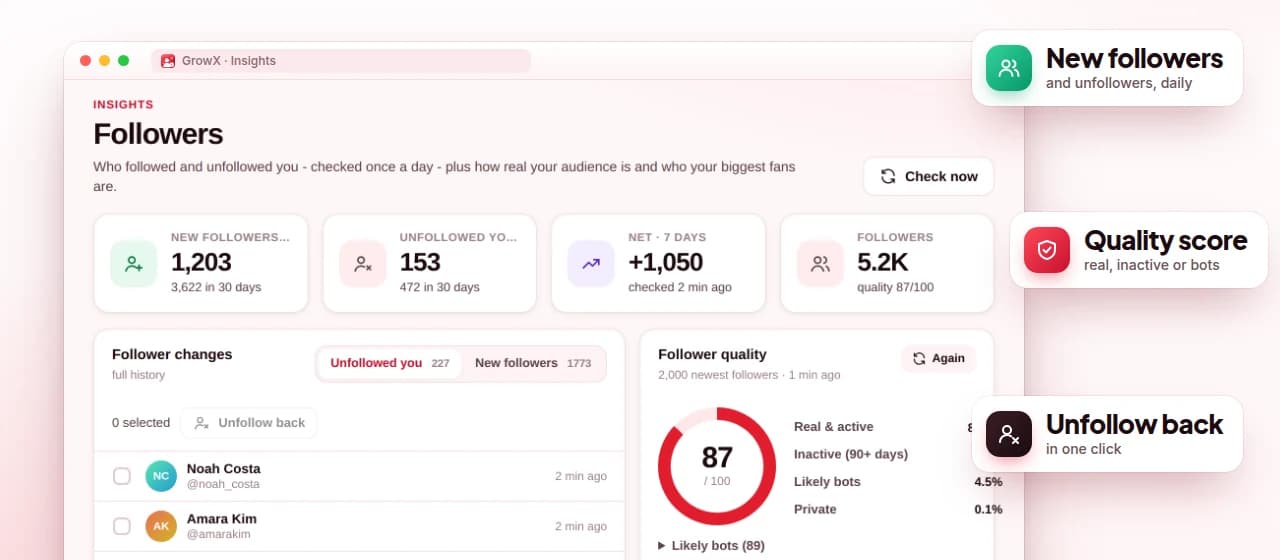
See who followed and who unfollowed you.

X doesn't tell you who unfollowed you. GrowX checks your follower list once a day and shows every change, plus how real your audience is and who your biggest fans are.

  • New followers and unfollowers, day by day
  • Follower quality: real, inactive, likely bots (Premium)
  • Clean up accounts that don't follow back, at a safe pace
GrowX Followers page: new followers, unfollowers, follower quality score and unfollow back (demo data)

Screenshot shows demo data.

How it works

Set up in five minutes.

A setup wizard walks you through it. After that, GrowX works in the background.

  1. 1
    Step 1

    Add GrowX to Chrome

    Install the free extension. It works inside your own x.com session and never asks for your X password.

  2. 2
    Step 2

    Add sources, pick a pace

    Name a few accounts in your niche, or let GrowX find them. Choose Safe or Balanced and press Start.

  3. 3
    Step 3

    Post, reply and measure

    Queue a few posts for your best times, reply early to fresh posts and see what brings followers.

Safety first

Paced like a careful person, not a bot.

GrowX respects the limits X signals. When X shows a warning it backs off by itself, and it stops completely when your account needs your attention. It never clicks through a challenge.

Emergency stopAlt+Shift+S

No tool can promise zero risk. Start with the Safe or Balanced pace.

Pace presets

v2.5.0
Safe
45-110 s between follows · up to 18/hour · ~150/day
BalancedDefault
30-75 s between follows · up to 28/hour · ~280/day
TurboPremium
18-45 s between follows · up to 40/hour · ~390/day
X PremiumPremium
12-32 s between follows · up to 60/hour · ~800/day
  • Random delays and regular breaks
  • Rolling hourly and daily caps
  • Optional active hours and warm-up
  • Slows down by itself after any X warning
  • Checks that follows really stick
  • Posting cap and gap between posts
  • Emergency stop: Alt + Shift + S
  • Runs in the background, resumes after restarts
Private by design

Your data stays with you.

Anonymous usage counts and feature usage are optional and can be switched off.

  • x.com session

    No X password

    GrowX works in the x.com session already signed in to Chrome. No password, no X OAuth.

  • chrome.storage

    Stored in your browser

    Your queue, history, posts and analytics live in Chrome's storage on your computer. Export a backup any time.

  • Chrome's built-in AI

    AI on your computer

    GrowX AI uses the model built into Chrome. Your drafts are never sent to GrowX, and there is no API key.

Pricing

Free forever. Premium when you want more.

Start free and try every Premium feature for 30 days. No credit card needed.

Free

$0 forever

  • Safe & Balanced auto follow
  • Schedule up to 10 posts at a time
  • Analytics for your latest 30 posts
  • Who unfollowed you (7 days)
  • Fresh posts to reply to, cleanup scan
Get started free

Premium

Best value: yearly

$14.99 / year

or $1.99 / 30 days · lifetime $59.99 ($29.99 early bird)

  • Everything in Free
  • GrowX AI writer, AI replies, unlimited scheduling
  • Turbo & X Premium paces, smart score
  • Full analytics, weekly report, follower quality
  • Bulk unfollow and automatic cleanup
See plans
Guides

Learn to grow on X

All articles
FAQ

Questions, answered.

More answers in the full FAQ, or contact support.

What is GrowX?

GrowX is a Chrome extension that brings the main X (Twitter) growth jobs into one place: smart auto follow, a post and thread scheduler, the GrowX AI writer, post analytics, an unfollower tracker, an AI Reply Assistant and cleanup tools.

Is GrowX free?

Yes. The free plan includes the Safe and Balanced auto follow paces, core filters, scheduling (up to 10 posts waiting), analytics for your latest 30 posts, 7 days of follower history, fresh posts to reply to and the cleanup scan. You can try every Premium feature free for 30 days, with no credit card.

Do I need to give GrowX my X password?

No. GrowX works through the x.com session that is already signed in to your Chrome browser. It never asks for or stores your X password and does not use X OAuth.

Is it safe for my X account?

No tool can promise zero risk; X makes its own decisions. GrowX is built to behave like a careful person: random delays, breaks, hourly and daily caps, optional active hours and warm-up, a posting cap, and an automatic slow-down or stop whenever X shows a warning.

How does the post scheduler work?

Write a post or thread, add images, then post now, pick a time or add it to your queue slots. GrowX posts through your signed-in x.com tab in Chrome, so Chrome needs to be running at the scheduled time.

Where does GrowX AI run?

On your own computer, using the AI model built into Chrome. Nothing is sent to GrowX and there is no API key. When the model isn't available, the AI buttons fall back to templates.

Can I see who unfollowed me on Twitter?

Yes. GrowX compares your full follower list once a day and shows who followed and who unfollowed you. The free plan keeps 7 days of history; Premium keeps the full history and adds one-click unfollow back.

How much is Premium?

$1.99 for 30 days, $14.99 for 365 days or $59.99 lifetime ($29.99 for the first 100 lifetime buyers). Plans are prepaid and never renew automatically. Start with the free 30-day trial first.

Start growing on X today.

Install GrowX for free and create your account in under a minute. Try every Premium feature for 30 days: no credit card, no commitment.