Skip to content
GrowX
Post scheduler

A free Twitter scheduler for posts and threads on X

Write a post or a thread, then post it now, pick a time or drop it into your next queue slot. GrowX publishes from your own x.com session in Chrome, shows when your followers are most active and keeps drafts, templates and a calendar in one place.

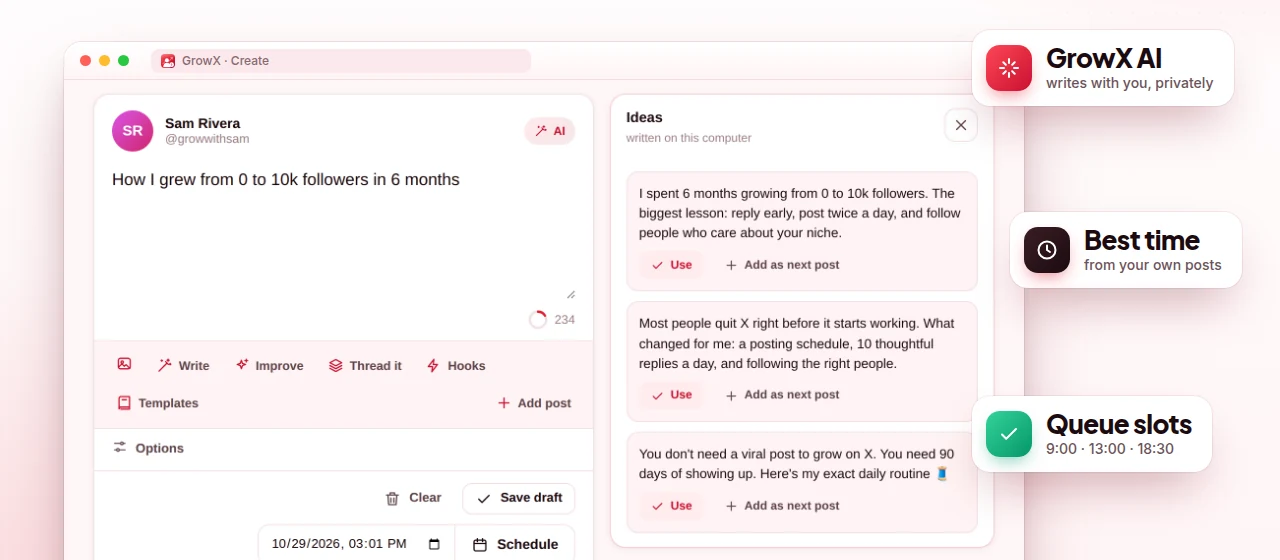
GrowX Create page with the post composer, AI ideas and queue slots (demo data)

Screenshot shows demo data.

What you get

Post scheduler, done right.

  • Posts and threads

    Threads of up to 25 parts, up to 4 images per post and X's own character counting, so what you write is what X accepts.

  • Post, schedule or queue

    Post now, pick an exact time, or add to the queue and let GrowX fill your next free slot (09:00, 13:00 and 18:30 by default).

  • Best time to post

    A week-by-hour heat map built from your own posts' engagement and the hours your followers are active.

  • Calendar, drafts and templates

    See everything on a calendar, keep drafts, and start from 52 built-in templates or your own.

  • Premium

    Unlimited scheduling

    The free plan keeps up to 10 posts or threads waiting at once. Premium removes the limit.

  • Premium

    Evergreen and auto-plug

    Post your best posts again every N days with rotating variants, and add a call-to-action reply to your own post once it takes off.

How it works

Three steps.

  1. 1

    Write it

    Open Create and write a post or a thread, or start from a template. The counter follows X's rules: links count as 23 characters and most emoji as 2.

  2. 2

    Pick when

    Post now, choose a date and time, or add it to the queue. The heat map shows which hours tend to work for your account.

  3. 3

    Let GrowX post it

    Keep Chrome running. GrowX posts at the planned time from your x.com session, within your daily cap and minimum gap.

How scheduling posts on X works in GrowX

GrowX is a Chrome extension, so scheduled posts are published by your own browser, inside the x.com session you are already signed in to. There is no separate login and no X password to hand over. When a post is due, GrowX publishes it as the X account it was written for, never from a different account you happen to be signed in to at the time.

That design has one real limit: Chrome and your computer must be on at the scheduled time. If the computer was asleep or off and a post is more than 6 hours late, GrowX does not post it by itself. It waits in the queue as "missed" so you can decide whether it still makes sense, instead of a stale post going out the next morning.

Server-based schedulers can post while your computer is off, but they work through an app connection to your X account. GrowX trades always-on posting for keeping everything in your browser: your posts, queue and settings stay in Chrome's storage on your computer, not on a GrowX server.

Queue slots, calendar and the best time to post

The queue works with time slots. You set the times you want to post (09:00, 13:00 and 18:30 every day by default) and Add to queue puts each new post into the next free slot. It is the easiest way to keep a steady rhythm: write several posts in one sitting and let the queue spread them across the week without picking a time for each one.

The best time to post heat map is a week by 24-hour grid built from two things: the engagement your own posts received at each hour and when your followers are active. It is specific to your account, which makes it more useful than generic advice. Use it to move queue slots toward the hours that are consistently warm, and read the best time to post on Twitter for a simple testing routine.

The calendar shows scheduled and queued posts by day, so gaps and clusters are easy to spot. Drafts keep half-finished ideas, and the 52 templates (hooks, threads, lists, stories and more) give you a starting structure when you are stuck. You can also save your own templates for formats you use every week, and a quick post box in the popup covers one-off posts.

Writing threads and long posts

Threads can have up to 25 parts, and each post can carry up to 4 images. The Thread it splitter turns a long draft into numbered parts, and the counter follows X's own rules (links count as 23 characters, most emoji and CJK characters as 2), so a part that looks fine will not be rejected for length. Accounts with X Premium can write long posts of up to 25,000 characters.

Prefer to plan outside the extension first? The free Twitter thread maker and tweet character counter on this site help you split a draft and check length before you paste it into GrowX. With GrowX Premium, the on-device AI writer can also suggest hooks, improve a draft or turn rough notes into a thread.

Posting safety and Premium extras

Scheduled posting has its own safety rules. GrowX posts at most 20 times a day by default, keeps at least 5 minutes between posts and pauses posting if X shows any warning. These limits stop a full queue from turning into a burst that looks automated. No tool can promise zero risk on X, so keep the defaults unless you have a clear reason to change them.

The free plan keeps up to 10 posts or threads waiting at once, which covers a few days of steady posting. Premium removes that limit and adds evergreen recycling, which posts your best posts again every N days (30 by default) with rotating variants or as a repost, and auto-plug, which replies to your own post with your call to action once it takes off (50 likes by default).

Plans

What's free, what's Premium

Every Premium feature is included in the free 30-day trial. No credit card.

Free $0 forever

  • Posts and threads (up to 25 parts, 4 images per post)
  • Post now, schedule, or add to queue slots
  • Up to 10 posts or threads waiting at once
  • Best time to post heat map, calendar and drafts
  • 52 templates, your own templates and the Thread it splitter
  • Quick post box in the popup

Premium from $1.99

  • Unlimited scheduling
  • Evergreen recycling of your best posts
  • Auto-plug: a call-to-action reply on your own post when it takes off
  • GrowX AI: Write, Improve, Hooks and Thread it on your computer
  • All included in the free 30-day Premium trial, no credit card
FAQ

Post scheduler: your questions

Can I schedule tweets on X for free?

Yes. GrowX's free plan lets you schedule posts and threads with up to 10 waiting at once. Premium removes the limit.

Does my computer need to be on for scheduled tweets to post?

Yes. GrowX posts from Chrome on your computer, so Chrome and the computer must be on. A post that is more than 6 hours late is not posted by itself; it waits as "missed" until you decide.

Can I schedule a Twitter thread with images?

Yes. Threads can have up to 25 parts and each post up to 4 images, and you can schedule or queue them just like a single post.

What is the best time to post on Twitter?

It depends on your audience. GrowX's heat map shows the hours that worked for your own posts and when your followers are active, which is more reliable for you than a generic chart.

Can I schedule posts for more than one X account?

Each post is published only as the X account it was written for. A separate workspace per X account is a Premium feature, and every GrowX account can link 2 X usernames for free.

More from GrowX

Related guides

Start growing on X today.

Install GrowX for free and create your account in under a minute. Try every Premium feature for 30 days: no credit card, no commitment.