Skip to content
GrowX
Follower tracker

Find out who unfollowed you on Twitter (X), every day

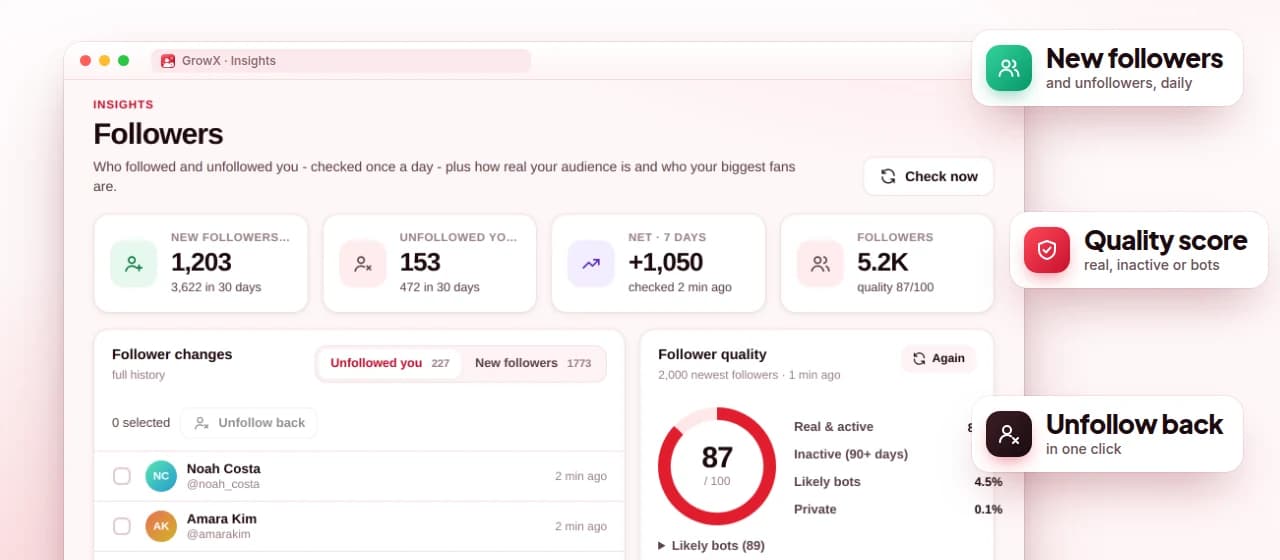
X does not tell you when someone unfollows. GrowX compares your full follower list once a day and shows who followed you and who left, with history, follower quality checks and your top fans.

GrowX Followers page with new followers, unfollowers, an unfollow back button and a follower quality breakdown (demo data)

Screenshot shows demo data.

What you get

Unfollower tracker, done right.

  • Daily follower comparison

    Once a day, GrowX compares your follower list with the previous one and lists your new followers and unfollowers.

  • 7 days of history, free

    The free plan keeps a week of follower and unfollower history, enough to see what happened after a post.

  • Top fans

    See who likes and replies to your posts most, so you know who to thank and engage with.

  • Premium

    Full follower history

    Keep your complete follower history instead of the last 7 days.

  • Premium

    One-click unfollow back

    Unfollow someone who left you straight from the tracker.

  • Premium

    Follower quality

    On request, sorts your newest followers into real and active, inactive (90+ days), likely bots and private accounts.

How it works

Three steps.

  1. 1

    Install GrowX

    Add the extension to Chrome and open x.com while signed in. There is no X app to connect and no password to enter.

  2. 2

    Wait for the first check

    The first daily check saves your follower list. From the next check on, GrowX can show who followed and who unfollowed.

  3. 3

    Review and decide

    Open Insights to see the changes. With Premium, you can also check follower quality and unfollow back in one click.

How the GrowX unfollower tracker works

X does not send a notification when someone unfollows you, and your follower count only shows the net change. The only reliable way to know who left is to compare your full follower list over time. GrowX does that for you: once a day it reads your follower list through an x.com tab you already have open and compares it with the previous check.

The result is two simple lists: who followed you and who unfollowed you since the last check. The free plan keeps 7 days of this history, which is enough to see what happened after a post or a busy week. Premium keeps your full follower history and adds one-click unfollow back for people who left.

What the tracker can and cannot tell you

An unfollow is not always a decision. Accounts that are suspended, deactivated or deleted also disappear from your follower list, so they can show up among your unfollowers. Before you unfollow anyone back, open the profile: if it no longer exists or is suspended, the change probably had nothing to do with you or your posts.

Because the check runs once a day, someone who follows and unfollows between two checks will not appear, and the time of an unfollow is only known to the day. Checks also need Chrome running with an x.com tab open, so no check happens on a day your computer stays off.

Every account loses some followers over time; it is a normal part of being on X. The useful signal is a pattern, such as a spike in unfollows after a certain kind of post or a change in posting rhythm, which you can cross-check against your posts in Twitter analytics.

Follower quality and top fans

Raw follower counts hide a lot. Follower quality (Premium) checks your newest followers on request and sorts them into real and active accounts, inactive accounts (no activity for 90+ days), likely bots and private accounts. It helps you judge whether a growth spurt brought real people, and whether a source or a popular post attracted the audience you actually want.

Top fans works the other way round: it lists the people who like and reply to your posts most. Those are the accounts worth replying to, thanking and keeping close, and you can tag them or mark them as VIPs in People. A small group of engaged fans often matters more than a large number of silent followers.

Tracker vs. checking by hand

Without a tracker, finding unfollowers means scrolling your follower list and trying to remember who used to be there, which stops working after a few hundred followers. Many web-based unfollower apps ask you to connect your X account through an app login. GrowX keeps the comparison in your own browser, inside your signed-in x.com session, and never asks for your X password.

If you want to act on the result, the unfollow tool scans everyone you follow and finds accounts that do not follow you back or have gone inactive, so you can clean up at a safe pace. For a step-by-step walkthrough, read who unfollowed me on Twitter.

Plans

What's free, what's Premium

Every Premium feature is included in the free 30-day trial. No credit card.

Free $0 forever

  • Daily check of who followed and who unfollowed you
  • 7 days of follower history
  • Top fans: who likes and replies to you most
  • People: tags, notes, VIPs and mutuals

Premium from $1.99

  • Full follower history
  • One-click unfollow back
  • Follower quality: real and active, inactive, likely bot, private
  • Weekly report with new followers and unfollowers
  • All included in the free 30-day Premium trial, no credit card
FAQ

Unfollower tracker: your questions

Can you see who unfollowed you on Twitter?

X does not notify you, but a tracker can compare your follower list over time. GrowX does this once a day and lists who unfollowed you since the last check.

Is there a free Twitter unfollower tracker?

Yes. GrowX's free plan shows who followed and unfollowed you with 7 days of history. Premium keeps the full history and adds one-click unfollow back.

Why does someone show as an unfollower when they did not unfollow me?

Suspended, deactivated and deleted accounts also disappear from your follower list. Open the profile before you react.

Does the unfollower tracker need my X password?

No. GrowX reads your follower list through the x.com session you are already signed in to in Chrome and never asks for your password.

How often does GrowX check for unfollowers on X?

Once a day, while Chrome is running with x.com open. Someone who follows and unfollows between two checks will not show up.

More from GrowX

Related guides

Start growing on X today.

Install GrowX for free and create your account in under a minute. Try every Premium feature for 30 days: no credit card, no commitment.