Skip to content
GrowX
GrowX AI

An AI tweet writer that runs privately on your own computer

GrowX AI writes, improves and threads your X posts with the AI model built into Chrome. It runs on your computer, uses your niche and voice settings, needs no API key and does not invent facts: anything it cannot know becomes a {placeholder}.

GrowX Create page with the composer, the Write, Improve, Thread it and Hooks buttons and AI ideas written on the computer (demo data)

Screenshot shows demo data.

What you get

AI writer, done right.

  • Premium

    Write and Improve

    Turn an idea into a post, or tighten a draft you already have, in the tone set in your voice settings.

  • Premium

    Hooks and Thread it

    Get several opening lines for the same idea, or turn notes and a long draft into a numbered thread that fits X's character rules.

  • Premium

    Reply ideas

    Suggested replies for posts in Reply targets. You edit them and send them yourself.

  • Premium

    On-device and private

    Runs on your computer with the model built into Chrome. No API key, no per-use fees and nothing sent to GrowX.

  • Premium

    Built not to invent facts

    When a post needs a number, name or result it cannot know, GrowX AI writes a {placeholder} for you to fill in.

  • Free templates and splitter

    52 templates and the plain Thread it splitter are free, and they are what the AI buttons fall back to when Chrome's model is unavailable.

How it works

Three steps.

  1. 1

    Set your niche and voice

    Tell GrowX what you post about and how you sound. The AI uses these settings for every suggestion it makes.

  2. 2

    Press an AI button

    In Create, choose Write, Improve, Hooks or Thread it. Chrome downloads its model once the first time; after that it runs on your computer.

  3. 3

    Edit, then post or schedule

    Fill any placeholders with real details, adjust the wording, then post now, schedule it or add it to your queue.

How an on-device AI tweet writer works

Most AI tweet generators send your text to a cloud model and charge per use or per month, sometimes through an API key you have to manage. GrowX AI uses the AI model that is built into recent versions of desktop Chrome. The model runs on your own computer, so your drafts are not sent to GrowX and there is no API key to set up or pay for.

Chrome downloads the model once, the first time it is needed. After that, GrowX AI calls it directly from the extension. Because it runs locally, GrowX gives it short, focused jobs: a post, a set of hooks, a rewrite, a thread outline or a reply idea. That is the kind of writing help most people actually want while composing on X, and it keeps you in charge of the final words.

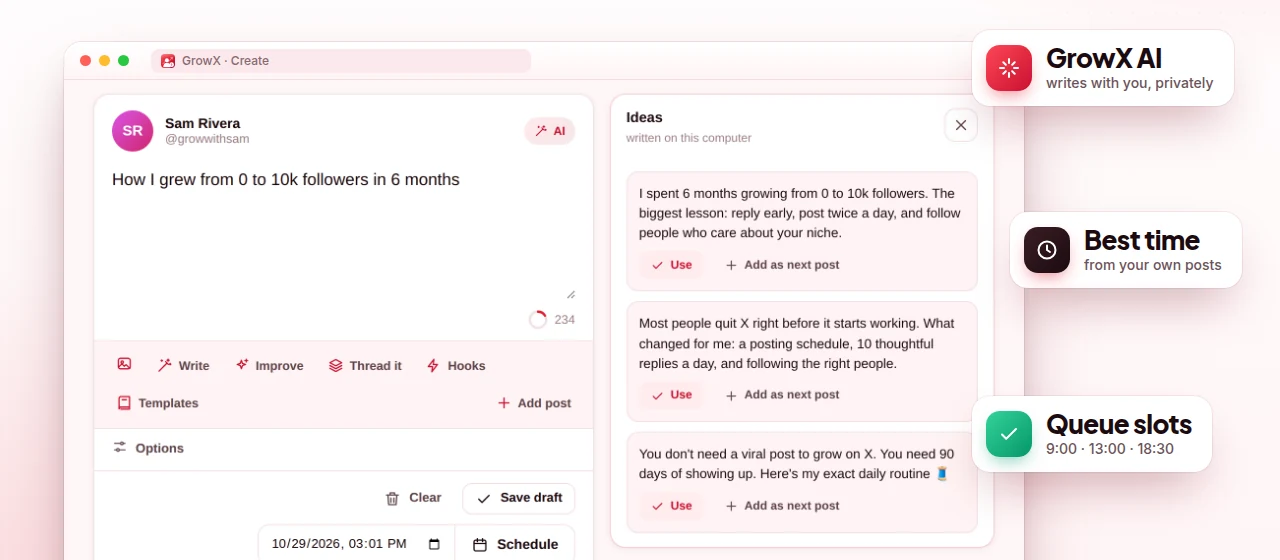
What GrowX AI can do

GrowX AI is part of GrowX Premium and appears as buttons where you already write, so you never copy text between tabs. Every suggestion uses the niche and voice settings you chose, which keeps the output closer to how you actually write than a blank prompt in a general chatbot.

None of these actions post anything. GrowX AI fills the composer or shows suggestions; you decide what to keep, edit it and then post, schedule or queue it yourself. Replies suggested in Reply targets are only sent when you press the button, and GrowX never sends DMs.

  • Write: a post from a topic or a rough idea
  • Improve: a clearer, tighter version of your draft
  • Hooks: several opening lines to choose from
  • Thread it: a long draft or notes turned into a numbered thread
  • Reply ideas: suggested replies to fresh posts in your niche
  • Weekly summary: a short read on how your week went

Why it does not invent facts

The biggest problem with AI-written posts is confident nonsense: invented numbers, fake results and quotes nobody said. GrowX AI is designed not to make up facts. When a post needs something only you know, such as a revenue figure, a client name or how long a project took, it leaves a {placeholder} instead, so the gap is obvious before anything is posted.

That makes the output a draft, not a finished post. Read it, fill the placeholders with real details and cut anything that does not sound like you. Posts built on specific, true experience are more interesting to read than generic advice, and they protect your credibility. For structure ideas, see how to write a Twitter thread.

Requirements, fallback and the free plan

GrowX AI needs a recent desktop version of Chrome on a computer with enough free memory and disk space for Chrome's built-in model. If the model is not available on your machine, the AI buttons do not break: they fall back to the matching templates and the plain thread splitter, so you can still write and structure posts.

On the free plan you get the same composer with 52 templates (hooks, threads, lists, stories and more), your own templates and the Thread it splitter without AI. Premium adds the AI actions above, and the 30-day Premium trial lets you test them on your own computer before you decide. AI suggestions are drafts; you stay responsible for what you post.

Plans

What's free, what's Premium

Every Premium feature is included in the free 30-day trial. No credit card.

Free $0 forever

  • 52 built-in templates and your own templates
  • Thread it splitter without AI
  • Composer with X's character counting, threads and images
  • Post now, schedule or queue (up to 10 waiting)

Premium from $1.99

  • GrowX AI: Write, Improve, Hooks and Thread it
  • AI reply ideas in Reply targets
  • Weekly AI summary
  • Runs on your computer: no API key, no per-use fees
  • All included in the free 30-day Premium trial, no credit card
FAQ

AI writer: your questions

Is there an AI tweet writer that needs no API key?

GrowX AI needs no API key and has no per-use fees, because it runs on the AI model built into Chrome. It is part of GrowX Premium, which you can try free for 30 days without a credit card.

Does GrowX AI send my drafts to a server?

No. It runs on your computer using Chrome's built-in AI model, and nothing is sent to GrowX.

Why do the AI buttons show templates instead of AI text?

Your Chrome version or computer cannot run the built-in model yet, for example because of limited memory or disk space. GrowX falls back to templates and the plain thread splitter so you can keep writing.

Can AI write a whole Twitter thread for me?

Thread it turns a long draft or notes into a numbered thread, and Write can start from a topic. Review every part and fill the placeholders before you post.

Will GrowX AI post or reply on X automatically?

No. It only fills the composer or suggests text. You decide what to post, and replies are only sent when you press the button.

More from GrowX

Related guides

Start growing on X today.

Install GrowX for free and create your account in under a minute. Try every Premium feature for 30 days: no credit card, no commitment.