How GrowX Auto Follow Works: The Complete Guide to Smart Following on X (Twitter)
From source profiles and recent followers first to scoring, pacing, safety stops and the source leaderboard: exactly what happens when you press Start in GrowX.
GrowX follows the newest followers of accounts in your niche, scores every candidate for follow-back likelihood and works through the queue one account at a time, with random delays, breaks and caps. It runs inside your own signed-in x.com session in Chrome.

Screenshot shows demo data.
Newest followers first, then score 1-99 (minimum 55)
Add accounts your audience already follows. GrowX reads their newest followers: people who are active on X right now and interested in your topic.
GrowX looks through the accounts you follow and ranks them by how active, mid-sized and follow-back-prone their audiences are.
Queued candidates are scored on follow ratio, audience size, activity, account age, profile and bio. Below your minimum (55 by default), they are skipped.
Random delays, breaks, hourly and daily caps, a slow-down after any X warning and an Alt+Shift+S emergency stop. Safety is never paywalled.
A small model learns from your own follow-backs and is blended in only when it clearly beats chance on held-out data.
Follow people from a post's reposts, replies and likes, from searches and #hashtags, or from X Lists.
Paste a few accounts in your niche, or press Find sources for me. Good sources are mid-sized accounts whose followers are active and follow back.
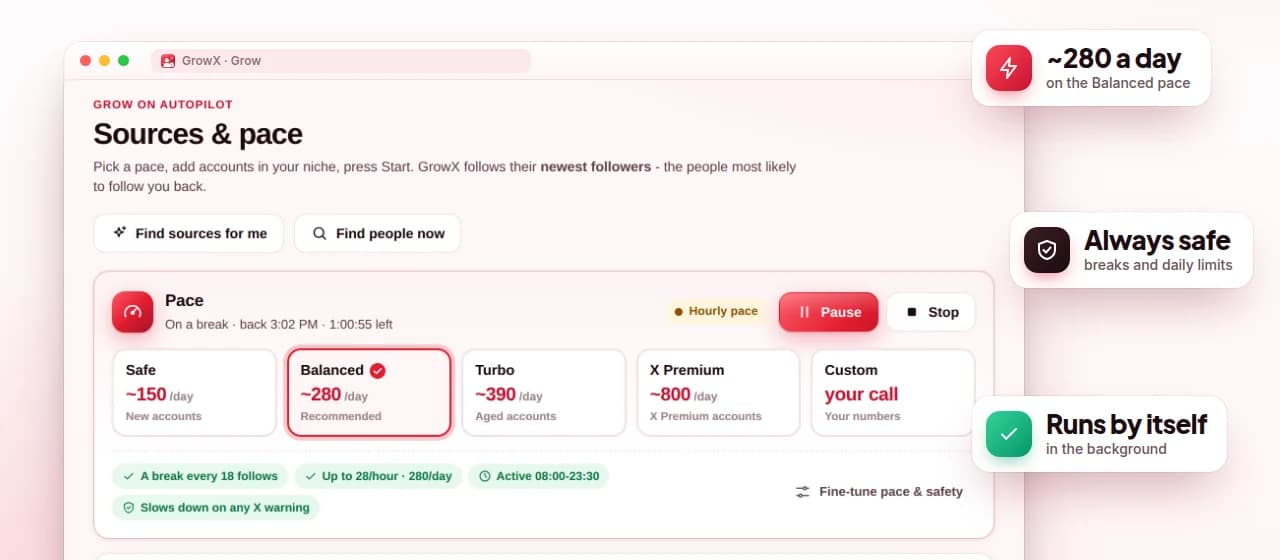
Keep the default filters or tune them, choose the Safe or Balanced pace, and turn on active hours and warm-up if you want them.
Press Start in the popup. GrowX follows recent followers first, then the best-scored candidates, and verifies each follow as it goes.
Many auto follow tools follow whoever shows up in a search. GrowX starts from source profiles: accounts your ideal audience already follows. It reads each source's newest followers, because someone who followed a niche account minutes or hours ago is active right now and clearly interested in the topic. If you are not sure which sources to use, Find sources for me checks the accounts you already follow and ranks them by how active, mid-sized and follow-back-prone their audiences are.
Recent followers first: the newest followers of each source (the top 50 of the list by default) are followed before anyone else. They skip the score but still pass the safety checks: no private accounts, no accounts without a photo or posts, no giant accounts and nothing that matches your exclude keywords. Everyone else goes into a queue of about 250 candidates sorted by score. Sources are re-read every hour and candidates older than 72 hours are dropped, so the queue stays fresh.
With Premium you can add more source types: the people who reposted, replied to or liked a specific post, the results of a search or #hashtag, and the members of an X List. The replies under a popular post in your niche are a strong source, because those people are engaged with exactly your topic at that moment.
Each candidate gets a follow-back score from 1 to 99. It weighs the follow ratio, audience size, how many accounts they follow, follow-back words in the bio, recent activity, account age, photo and bio, verified status and how recently they followed the source. Queued candidates below your minimum (55 by default) are not followed; only the recent followers described above skip the score. Read how the follow-back score works for the details.
Before scoring, hard filters remove accounts you do not want: people you already follow or who already follow you, private accounts, accounts without a photo, and accounts outside your limits for followers (15 to 8,000 by default), following (at least 40), follow ratio (0.4), posts (5), account age (30 days) and last activity (45 days). Exclude keywords skip bios you want to avoid, boost words lift bios that talk about following back, and a never-follow list blocks specific accounts for good.
The smart score (Premium) goes a step further. After roughly 80 settled follows with at least 12 follow-backs and 12 non-follow-backs, GrowX trains a small model on your own results, tests it on a holdout set and blends it in at up to 60% weight, but only when it clearly beats chance. Premium also adds include and location keywords, verified filters and importing a list of usernames to follow first.

GrowX follows one account at a time from the extension's background, so it keeps working when the popup is closed and resumes after Chrome restarts. The pace preset sets the delay between follows, how often it rests and the rolling caps. Safe (about 150 a day) suits new accounts and Balanced (about 280 a day) is the recommended default; both are free. Turbo (about 390) is for aged accounts and the X Premium pace (about 800) is only for accounts with X Premium; both need GrowX Premium.
These controls lower risk; they cannot remove it. No tool can promise zero risk on X, and X can change its limits at any time. Start on Safe with warm-up turned on for a new or quiet account, watch for warnings, and move up only after a few days without any. See how GrowX auto follow works for the full pacing logic.
Following by hand works, but it is slow and inconsistent: you scroll a big account's followers, open profiles one by one and guess who might follow back. Most of the time goes into checking profiles rather than deciding. GrowX runs the same checks you would (photo, bio, activity, ratio, audience size) on every candidate, keeps the decisions consistent and spreads the follows across the day instead of doing them in a burst.
It also shows which sources are worth keeping. The source leaderboard lists the follow-back rate, retention and cost of each source, so you can drop the ones that bring nobody. With Premium, auto-replace weak sources retires a source after a fair trial and swaps in the best auto-found one, and you can restore it later. Pair the autopilot with a regular cleanup of non-followers to keep your following count healthy.
Every Premium feature is included in the free 30-day trial. No credit card.
No tool can promise zero risk on X. GrowX lowers the risk with random delays, breaks, hourly and daily caps, warm-up, an automatic slow-down after any X warning and an emergency stop (Alt+Shift+S).
GrowX's presets aim for about 150 a day (Safe) or 280 a day (Balanced) on the free plan, and about 390 (Turbo) or 800 (X Premium accounts only) with Premium. X's own limits can change, so start low and move up only after clean days.
No. GrowX works inside the x.com session you are already signed in to in Chrome. It never asks for your X password and does not use X OAuth.
Yes. It runs in the extension's background service worker while Chrome is open, keeps the computer awake while it runs and resumes after Chrome restarts.
Only if you turn on automatic cleanup (Premium), which unfollows GrowX's own follows that did not follow back after 2, 5 or 7 days. Accounts you followed yourself or imported are never touched.
From source profiles and recent followers first to scoring, pacing, safety stops and the source leaderboard: exactly what happens when you press Start in GrowX.
The follow-back score (sometimes searched as a Twitter growth score) is how GrowX decides who is worth following. Here is what goes into it, and how the smart score learns from your own results.
Bulk following does not have to mean reckless following. Here is how to follow many relevant people on X at a safe pace with GrowX smart auto follow.
F4F can grow a follower count fast, but those followers rarely read you. Here is an honest look at follow for follow on X, and how to aim for people who will.
Your follower ratio is a quick credibility signal, and it decides how far past 5,000 you can follow. Here is how to read it and how to improve it without tricks.
What really happens when you mass follow on X, why limits exist and how to stay inside them.
Install GrowX for free and create your account in under a minute. Try every Premium feature for 30 days: no credit card, no commitment.